Watch Your Words Shape the Video
See how easy editing becomes when everything starts with text in FalcoCut. From changing the visual style to applying the final polish, you can refine your videos naturally without touching a complex timeline.
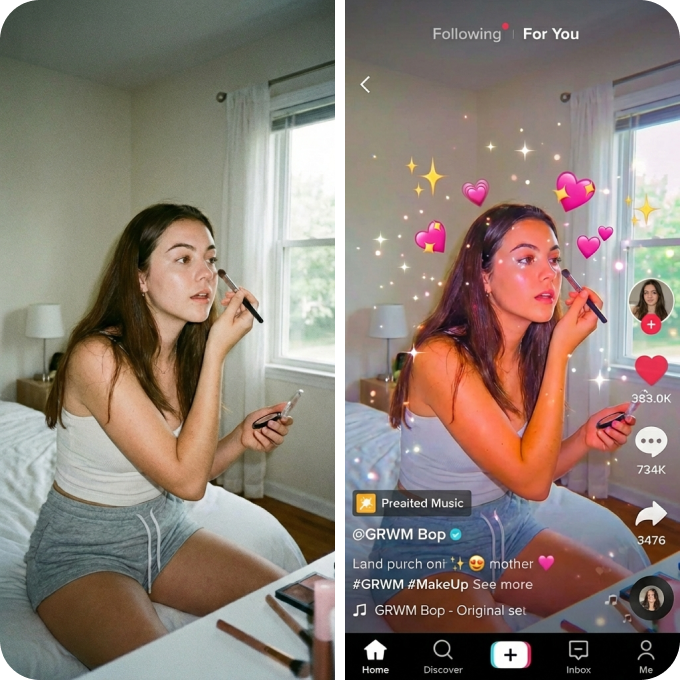
Style TikTok Ads
Transform raw clips into viral-ready assets by applying trendy visual aesthetics and fast-paced text overlays that stop the scroll.

Render Product Showcases
Transport your items into premium scenes with professional lighting and background swaps that make any product look luxury.
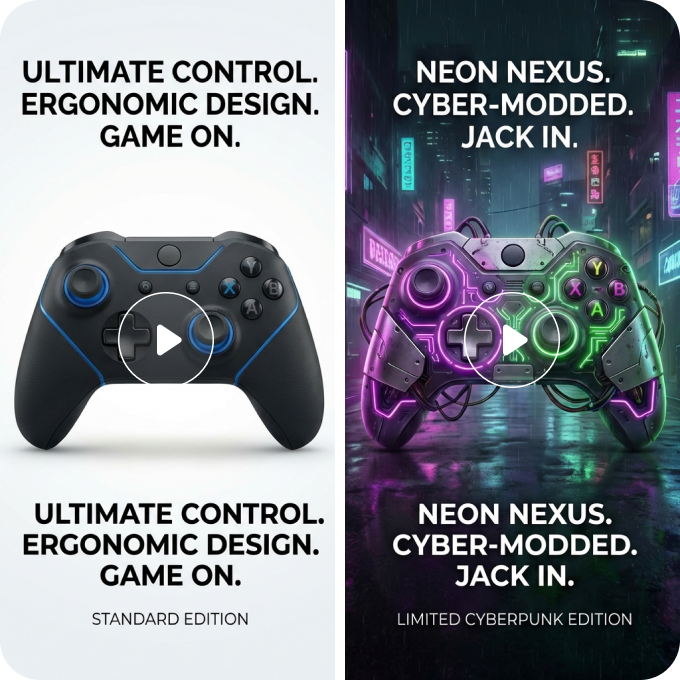
Refine Marketing Videos
Polish standard footage into high-energy promotional clips using bold styling and dynamic text to drive immediate clicks.
How to Edit a Video with FalcoCut
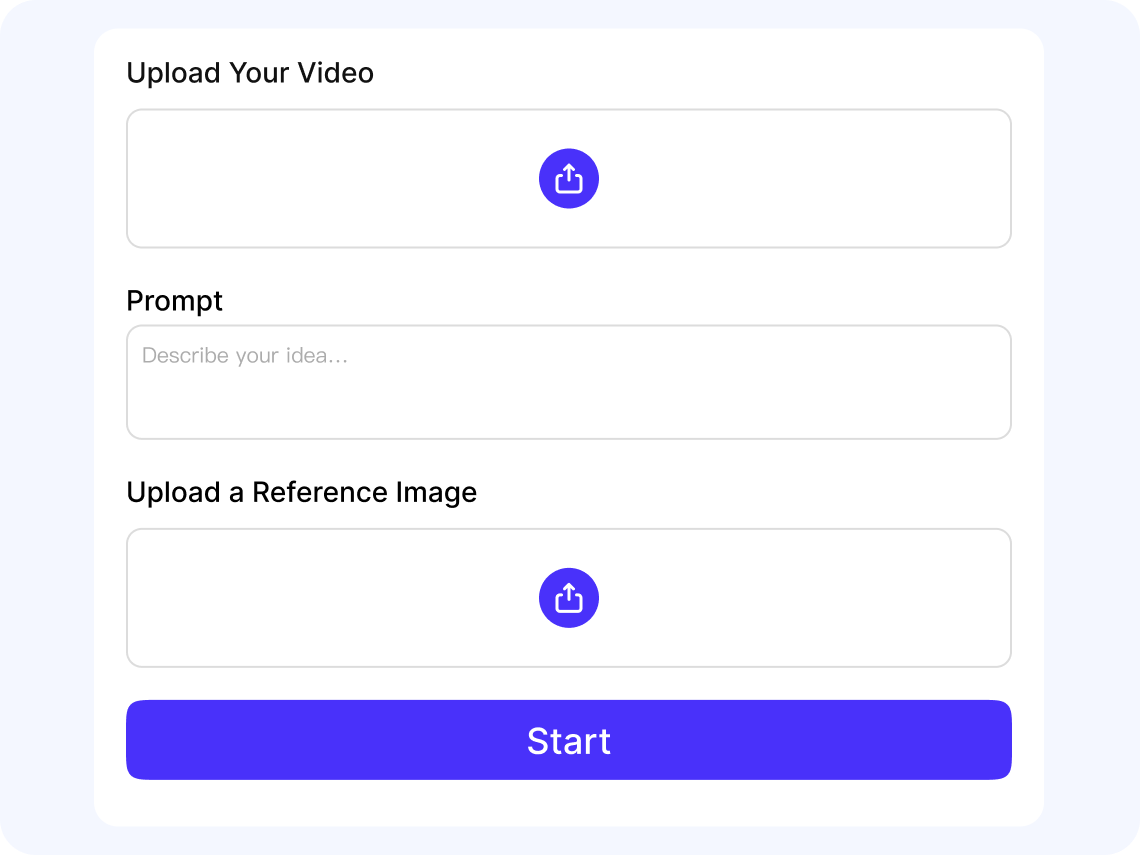
Upload Your Video
Upload your video(MP4/MOV) to FalcoCut to begin editing.
Describe the Edit You Want
Tell FalcoCut what to do with simple text commands. The AI instantly applies your instructions without manual timeline work.
Add a Reference Image
Upload a photo or pick one from your asset library to guide the look of your video.
Generate, Preview, and Export
Click Start to let FalcoCut process your edits. Review the preview, make quick adjustments if needed, and export your finished video.
Powerful Features Built for Fast, Simple Editing
FalcoCut brings smart AI into a clean, easy workflow so anyone can edit videos without learning complex software. Every feature is designed to save time, reduce effort, and help creators publish more content across every platform.

Text‑Based Editing
Tell FalcoCut what you want, and the AI handles the rest. You simply type your instructions—remove text, clean up a scene, adjust visuals—and our video editor applies the edits for you. It’s a fast, intuitive way to update your videos without learning complex tools or timelines, so you can focus on the message instead of the mechanics. You’ll find this especially useful when you need quick edits for social posts, product demos, or last‑minute campaign updates.

Give Your Video a Fresh Style
Refresh the look of your footage using a simple text prompt. FalcoCut can reinterpret your video in a new style, such as cartoon, hand‑drawn, cinematic, or colorful artistic looks, while keeping the original movement and pacing intact. It offers a quick way to explore new creative directions, adjust the mood of your content, or prepare alternative versions for different audiences. So you can easily experiment with visual identity without reshooting or rebuilding your material.
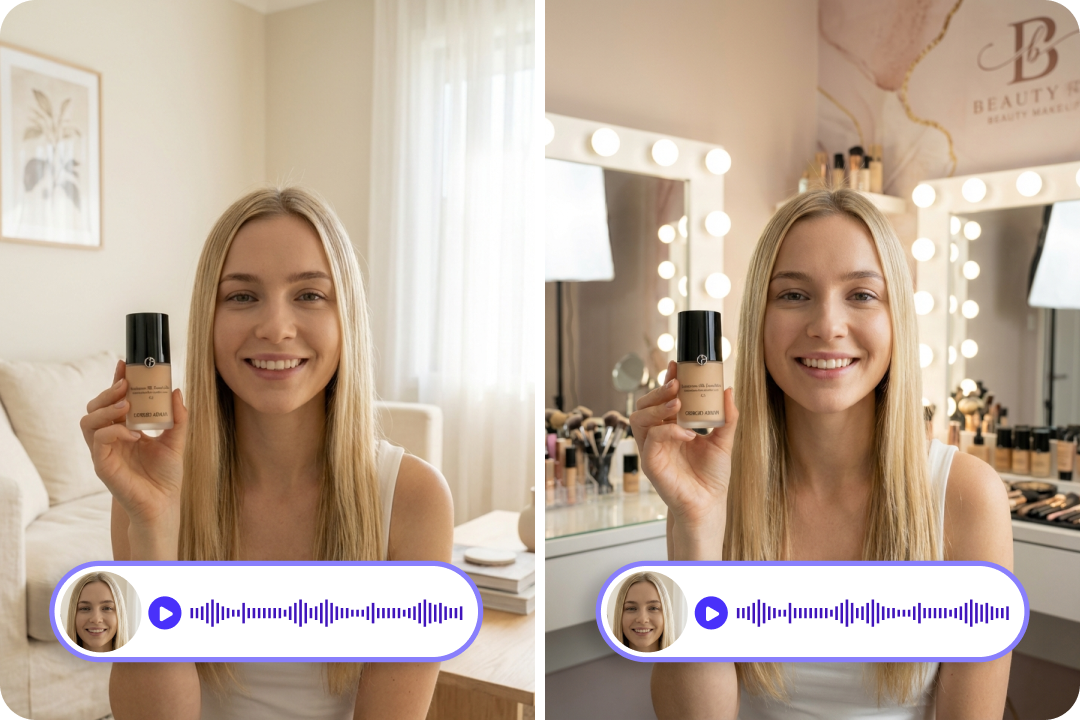
Keep Your Original Audio
Keep the audio you love while editing everything else. With one toggle, FalcoCut protects your original sound so your voice, your music, and your ambience stay exactly as they were recorded. Nothing gets overwritten during the edit, which makes it easy to clean up visuals without changing the way your video sounds. This works especially well for talking‑head videos, tutorial clips, and any content where your natural audio is important.
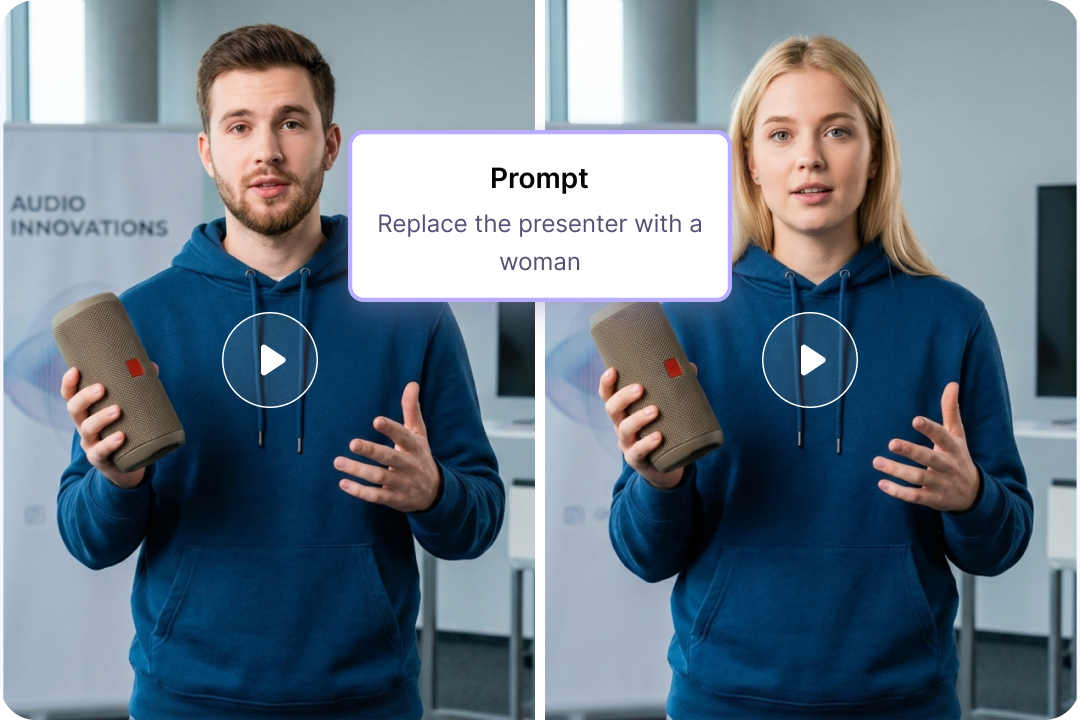
Swap Characters Without Reshoots
Replace the main character in any video using a simple text command or by uploading a reference photo. FalcoCut analyzes every frame and seamlessly recasts the original person with your chosen character while preserving motion, lighting, and scene continuity. The result is a natural, consistent transformation that feels like it was filmed that way from the start. It’s a powerful way to refresh marketing visuals, test new ad concepts, or generating product‑focused e‑commerce videos featuring different models or brand ambassadors.

Refine Background with AI
Transform your background without a studio setup. You can ask FalcoCut to remove a messy backdrop or switch to a cleaner, more professional environment. The editor helps you create videos that look polished and on‑brand, whether you’re filming product demos, presentation videos, or social clips. It’s especially useful when you’re recording in tight spaces, busy locations, or any environment that isn’t camera‑ready.
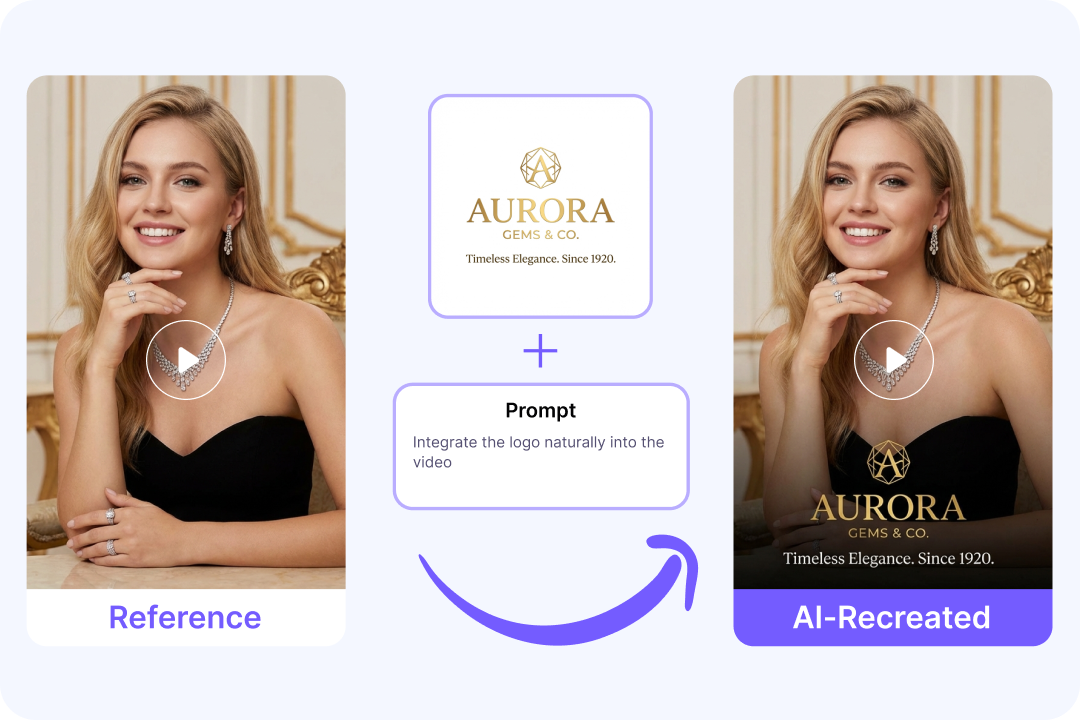
Integrate Elements Into Video Naturally
Enhance your video by adding elements into your video without breaking the flow of the scene. FalcoCut can place product images, icons, or other on‑screen elements in a way that aligns with the human subject, making the final result look intentional rather than pasted on. You can highlight key features, showcase products, or add branded touches without worrying about awkward positioning. The effect is most noticeable in product demos, reviews, and any content that relies on added visuals feeling intentional and seamlessly blended into the shot.
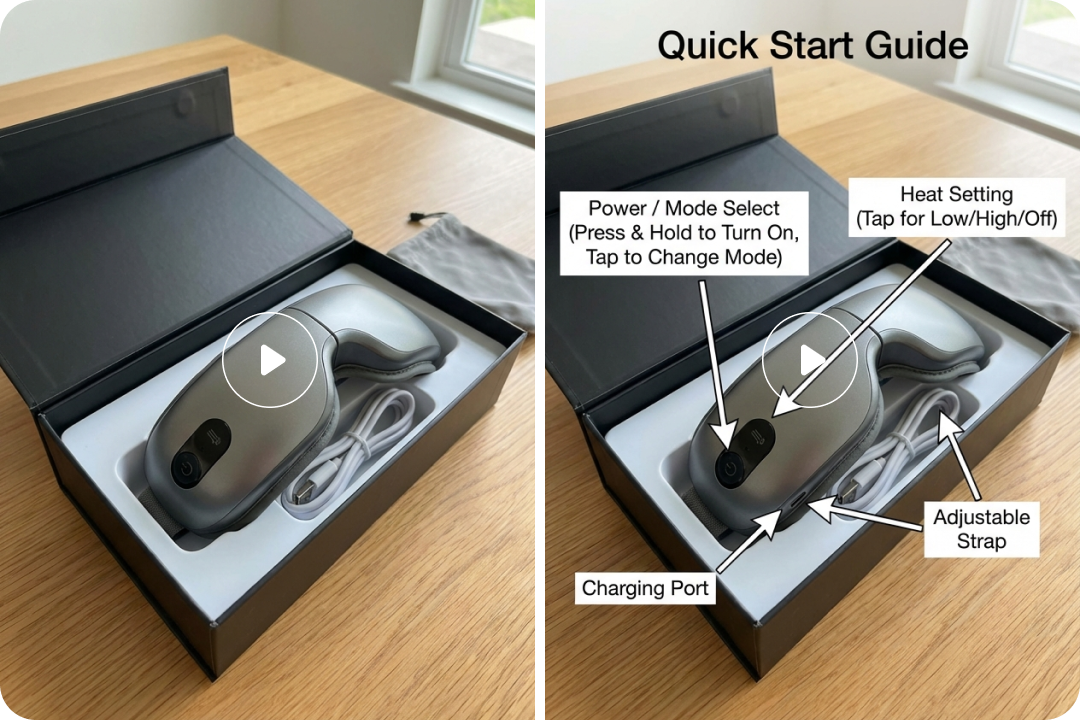
Add Text to Video
Add clear, simple text to your video without needing a separate design tool. FalcoCut can generate basic titles, labels, or short captions from your input and place them directly on the timeline, giving you a quick way to highlight key points or add context. It’s a practical option for drafts, internal updates, onboarding walkthroughs, or any moment where a straightforward text layer helps guide the viewer. While the styling is minimal, it provides a fast foundation you can build on as you refine your edit.
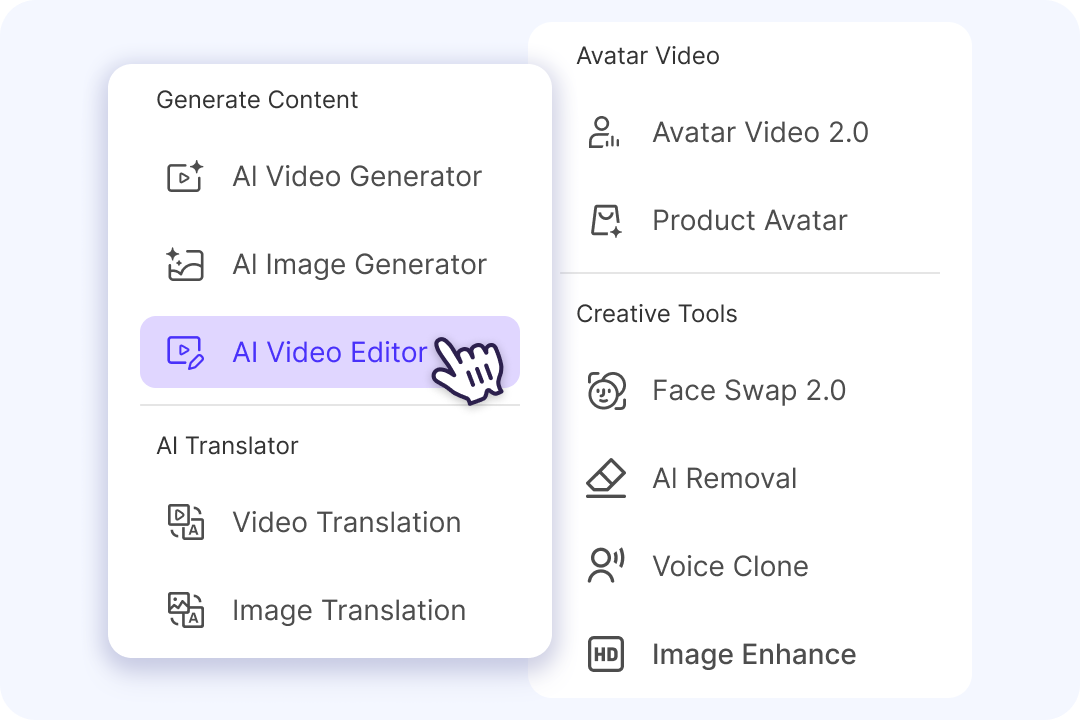
Creative Hub for AI Video Workflows
Teams work faster when everything they need sits in one shared space. FalcoCut brings video creation, editing, voice tools, translation, and creative tools into a unified workspace that supports smooth collaboration. Teammates can review clips, refine drafts, and build on each other’s progress without switching platforms or losing context. This connected environment helps groups move from initial concept to final delivery in a steady, coordinated flow that supports a wide range of content types and creative goals.
Edit Smarter. Create Without Limits
AI Video Editor helps you transform existing videos into new creative assets — without reshooting, complex software, or long production cycles.
Product Swap
Replace the product in hand without reshooting. Turn one beauty demo into multiple product variations — foundation, lipstick, palette, or skincare — while keeping the same presenter and scene. Perfect for testing new SKUs, launching updates, or refreshing creatives quickly.


Why Choose FalcoCut AI Video Editor
FalcoCut makes video editing simple, fast, and affordable for everyone. It removes the stress of learning complex tools and helps teams stay consistent across platforms. With our video editor, more videos get finished with less effort and fewer resources.
Simple to Learn
Complex steps are replaced with clear, guided actions that make editing feel approachable. Even first‑time creators can produce clean, polished videos without a long learning curve.
High‑Quality Output
Every edit is processed with consistent precision, helping videos look clean and polished without extra effort. Deliver pro‑level results even on tight timelines or smaller budgets.
Faster Result
Trimming, pacing, and formatting happen quickly, turning long edits into short tasks. Staying active across platforms becomes far more realistic when the process moves this fast.
Privacy You Can Trust
Your files stay protected over the editing process with strict handling and controlled access. Teams can work confidently knowing their content remains secure from upload to export.
Versatility for Any Workflow
The editor adapts to different content types, from training clips to social posts and product demos. Teams can switch between tasks easily without changing tools or rebuilding their setup.
Budget‑Friendly Editing
Even small teams can manage video creation without heavy software expenses. The low cost makes it easy to stay active with content throughout the week.
Old Way vs. FalcoCut AI Video Editor
Editing used to mean long nights, complicated software, and endless tiny fixes. FalcoCut lets you edit videos in seconds with simple prompts — so you can focus on creating, posting, and growing your audience instead of fighting timelines and tools.
Old Way
- •2‑6 hours lost per video instead of creating
- •Multiple apps needed for captions, cuts, and effects
- •Manual edits for every clip, every platform, every format
- •$100–$500 per project if outsourcing
- •Constant back‑and‑forth steps that slow down the entire workflow
New Way with FalcoCut
- •AI edits done in minutes
- •One tool replaces 5+ creator apps
- •Edit with simple text prompts — no editing skills needed
- •Lower editing costs by automating repetitive tasks
- •A streamlined workflow that keeps every step in one place
What Our Customers Say
Finally, Editing Doesn’t Eat My Whole Day
I used to spend hours cutting clips and fixing small mistakes in my product videos. It slowed down my posting schedule and made editing feel like a chore. FalcoCut AI editor lets me clean up scenes and adjust the pacing of my videos with simple prompts. Now I finish edits in minutes instead of nights.
YouTube Content Creator
Olivia Bennett
Perfect for Quick Client Turnarounds
As a freelance video editor, I often get last‑minute requests that used to stress me out. FalcoCut helps me handle fast edits, subtitle fixes, and translations without opening multiple apps. The text‑based editing is a lifesaver when I need to make changes on the fly. My clients think I’m working magic.
Freelance Video Editor
Marcus Holloway
Made My Social Videos Look Way More Professional
I run a small online shop and always struggled with editing videos for TikTok and Reels. I didn’t know how to cut clips or add effects without messing something up. FalcoCut makes everything simple — I just type what I want, and the AI handles the rest. My videos look cleaner, sharper, and way more engaging.
Small Business Owner
Jenna Clarke
Great for Recasting Videos Instantly
We often need to swap talent for different campaigns, and FalcoCut makes it effortless. Upload a photo, give it a prompt, and the character changes while the motion and lighting stay perfectly natural. It saves us from reshoots and keeps our content adaptable across markets.
Creative Director
Daniel Whitmore
Reliable Tool for Our Training Video Edits
FalcoCut helps us polish short training clips quickly with simple text‑based edits. The results stay clean and consistent, which makes it easier to deliver clear learning materials across the company. It’s streamlined our workflow and reduced the time we spend on routine edits.
Learning & Development Specialist
Sarah Lawson
A Huge Upgrade for My Ad Production Workflow
Creating ad variations used to take forever, especially when clients wanted multiple versions for different markets. FalcoCut lets me edit videos fast, so I can deliver more options without burning out. The AI handles the heavy lifting, and I focus on the creative decisions. It’s changed how I work.
Paid Media Manager
Hailey Wilson
Explore Our AI Tools


Frequently Asked Questions
What is an AI video editor?
How does an AI video editor work?
What are the applications of AI video editors?
How do I edit a video with FalcoCut?
- Step 1: Upload your video (MP4 or MOV) to FalcoCut.
- Step 2: Enter a text prompt describing the edit you want—cut, enhance, remove objects, adjust pacing, etc.
- Step 3: Upload a photo if you want the AI to reference a style or visual element.
- Step 4: Click Start, preview the result, and export your edited video.
Does FalcoCut work in a browser or do I need to install software?
What video formats does FalcoCut support?
Is there a file size limit for video uploads?
Is FalcoCut a free AI video editor?
Does the free plan include a watermark on the video?
Does FalcoCut work on low bandwidth?
Why is my video export stuck?
Is my video data secure with FalcoCut?
Create Scroll‑Stopping Videos Faster Than Ever
Edit clips, fix scenes, and localize content in seconds using FalcoCut's best AI video editing software. The fastest way to transform your ideas into pro‑ready videos.